---
title: "Register a Data Aggregate"
description: "Register a Data Aggregate, a Data Element whose value is computed across multiple rows, for use in Features, Models, and Policies."
---
import { Tabs, TabItem } from '@astrojs/starlight/components';
TL;DR
Compute a value across multiple rows (like "max DPD in the last 6 months") and register it as an Aggregated Data Element. Tick Is Aggregated on the Data Element form, point at one or more source tables, and write the aggregation in Python, Pandas, or Spark.
## What is it?
An **Aggregated Data Element** is one whose value is computed across multiple rows rather than read from a single column. Use it when the value you need has to be calculated across records, for example counting an account's transactions, taking the max DPD over the last 6 months, or rolling Account rows up to a Customer.
Simple Data Element
Data Aggregate (this page)
Maps from
A single column
Multiple rows across one or more tables
Use when
The column value is ready to use as-is
You need to compute something across records
Example
annual_income from app_table
Max DPD in the last 6 months: the highest days_past_due across the last 6 rows in account_performance
## How to Register
Follow these steps to register a Data Aggregate.
#### Open the Create Form
On the **Data Vault → Data Element** page, click **+ New Data Element**.
A name prompt opens first. Enter a descriptive name for the Data Element (for example, `Total Deposit Amount (Last 90D)`) and confirm to land on the full Data Element form.
#### Fill in Attributes
Set the **Data Type** * - the **output type of your aggregation** (for example, `numerical` for a count or sum, `boolean` for a flag).
Fill in the **Alias** and **Entity**. See [Common Registration Info](/user-guide/how-tos/common-registration-info/).
Tick **Is Aggregated**. This switches the Definition section into aggregation mode, revealing an Input Type editor in place of the Source Column dropdown.
:::note[Picking the right Data Type]
The **Data Type** must match what your code returns:
- Counting rows or summing amounts → `Numerical`
- Returning a list of values → `Array Numerical` (or `Array String`, etc.)
- Returning a flag or category label → `String` or `Boolean`
The platform validates the return value against this type when you save.
:::
#### Fill in Definition
- **Source Tables** * - one or more tables linked to the entity. Each chosen table becomes a variable in the editor: a table aliased `account` is referenced as `account` in code.
- **Source Columns** * - the specific columns from those tables that your aggregation reads. Each one is exposed inside the corresponding table variable.
- **Input** - any reusable global function registered on the platform that the aggregation should call.
- **Input Type** - pick the language used for the aggregation (Python, Pandas, or Spark), then write the logic in the editor below.
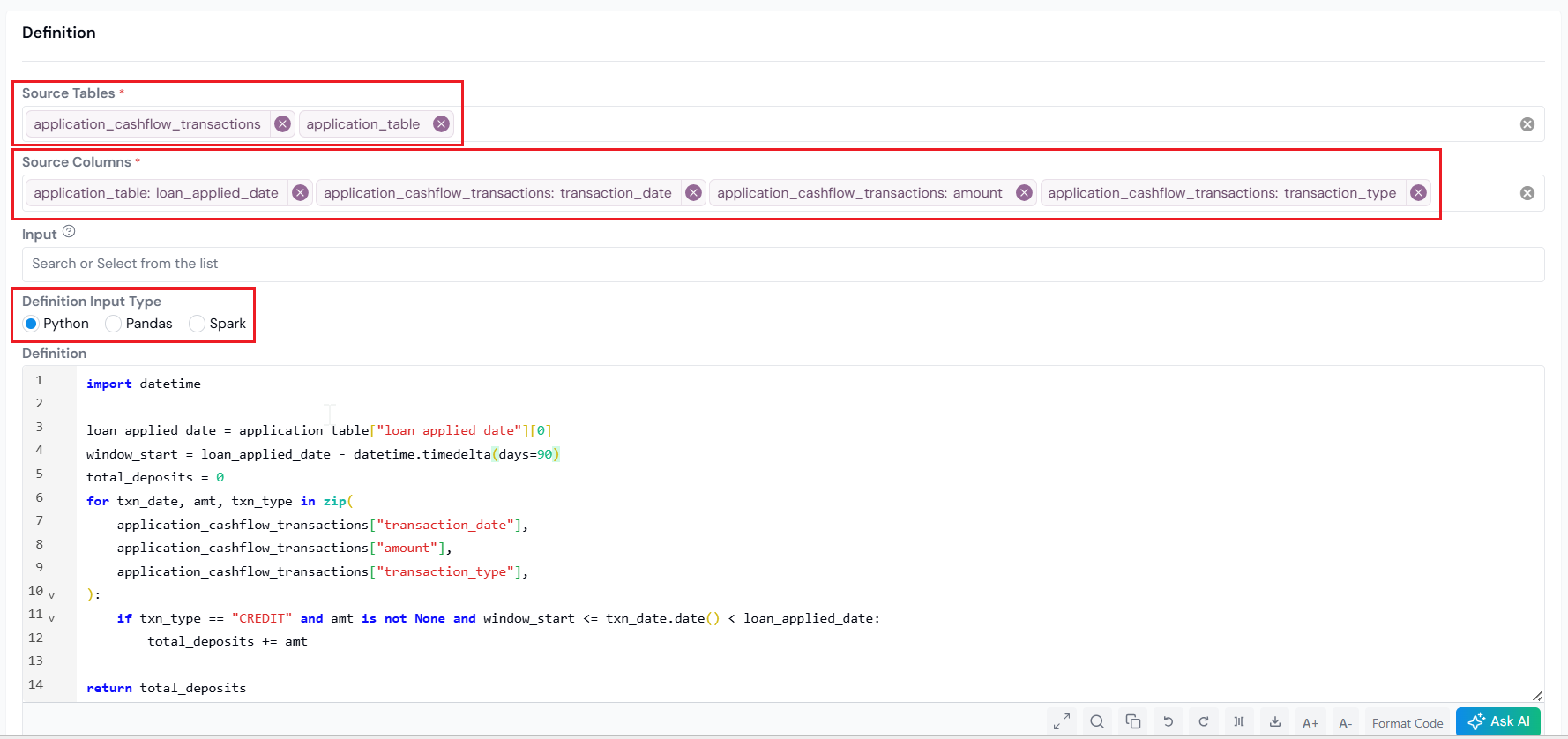
Source Tables and Source Columns feed the aggregation; the Input Type selector picks the language.
#### How the platform groups your data
When you set **Entity** to Customer, and pick `account` (an Account-level table) as the source, Account rolls up to Customer. The platform groups Account rows by Customer before handing them to your code. **Python** and **Pandas** receive the data already filtered to one customer's rows, so you write logic for a single entity. **Spark** receives the full source table and you must do the `groupBy('customer_id')` yourself, returning a DataFrame keyed by the entity.
Pick the input language that fits how you want to work with the data:
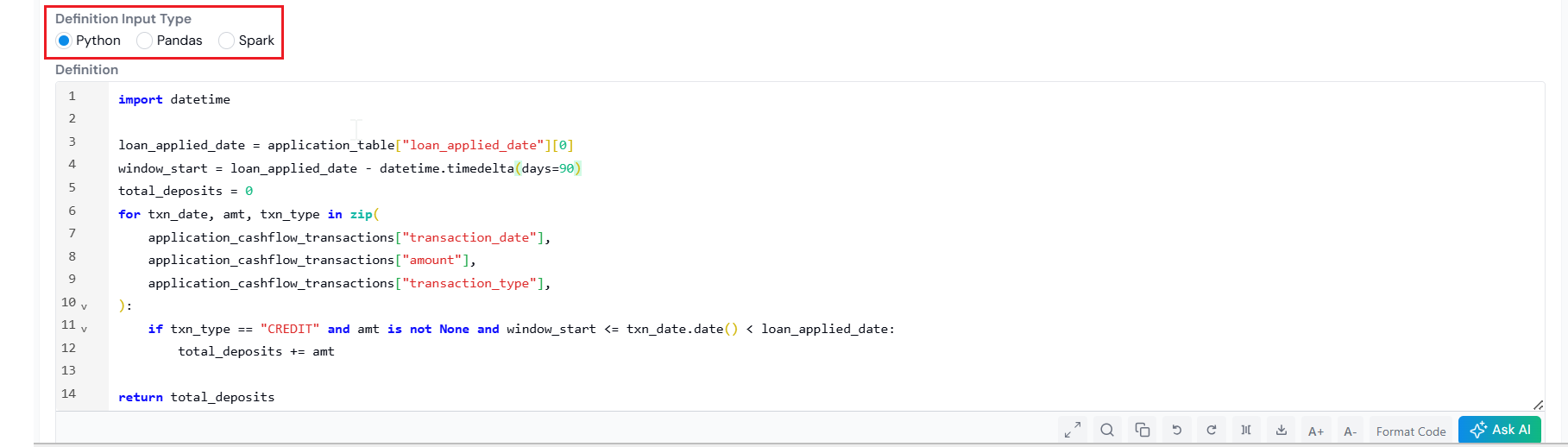
Python Input Type exposes each table as a dictionary of lists, already filtered to the current entity.
When you select **Python** as the Input Type, each source table is exposed as a **dictionary of lists**, sliced to the rows belonging to the current entity. Each column lookup returns a Python list. You can import standard libraries (`numpy`, `math`, `datetime`, etc.) inside the editor.
**Example 1: Total number of accounts for customer**
*Inputs:*
- **Source Tables**: `account`
- **Source Columns**: `account_id`
Only `account_id` is selected, so that is the only key available inside `account`. The platform hands your code a dictionary that looks like this:
```python
account = {
'account_id': [101, 102, 103],
}
```
Then your aggregation runs on top of it:
```python
# `account` is a data dictionary
return len(set(account['account_id']))
```
**Example 2: Default in the next 12 months of application**
*Inputs:*
- **Source Tables**: `account`, `account_performance`
- **Source Columns**: `account.account_application_date`, `account_performance.record_date`, `account_performance.charge_off_amount`
Each table is its own dictionary, with one key per selected column. The platform hands your code the data sliced to one application's rows:
```python
account = {
'account_application_date': ['2024-01-15'],
}
account_performance = {
'record_date': ['2024-04-01', '2024-08-15', '2025-03-01'],
'charge_off_amount': [None, 500, None],
}
```
Then your aggregation runs on top of it:
```python
import datetime
# sum charge_off_amount for records within 1 year of `account_application_date`
application_date = account['account_application_date'][0]
total_charge_off_amount = 0
for date, co_amt in zip(
account_performance['record_date'],
account_performance['charge_off_amount'],
):
if (
date >= application_date
and date - application_date < datetime.timedelta(days=365)
and co_amt
):
total_charge_off_amount += co_amt
# default flag if total_charge_off_amount > 0
if not total_charge_off_amount:
return 0
elif total_charge_off_amount > 0:
return 1
else:
return 0
```
**Example 3: Total deposit amount in the 90 days before application**
*Inputs:*
- **Source Tables**: `application_table`, `application_cashflow_transactions`
- **Source Columns**: `application_table.loan_applied_date`, `application_cashflow_transactions.transaction_date`, `.amount`, `.transaction_type`
The Entity here is Application, so both dictionaries are sliced to one application's rows. The platform hands your code the data like this:
```python
application_table = {
'loan_applied_date': ['2025-04-01'],
}
application_cashflow_transactions = {
'transaction_date': ['2025-01-15', '2025-02-20', '2025-03-10'],
'amount': [200, 500, 300],
'transaction_type': ['CREDIT', 'DEBIT', 'CREDIT'],
}
```
Then your aggregation runs on top of it:
```python
import datetime
loan_applied_date = application_table["loan_applied_date"][0]
window_start = loan_applied_date - datetime.timedelta(days=90)
total_deposits = 0
for txn_date, amt, txn_type in zip(
application_cashflow_transactions["transaction_date"],
application_cashflow_transactions["amount"],
application_cashflow_transactions["transaction_type"],
):
if (
txn_type == "CREDIT"
and amt is not None
and window_start <= txn_date.date() < loan_applied_date
):
total_deposits += amt
return total_deposits
```
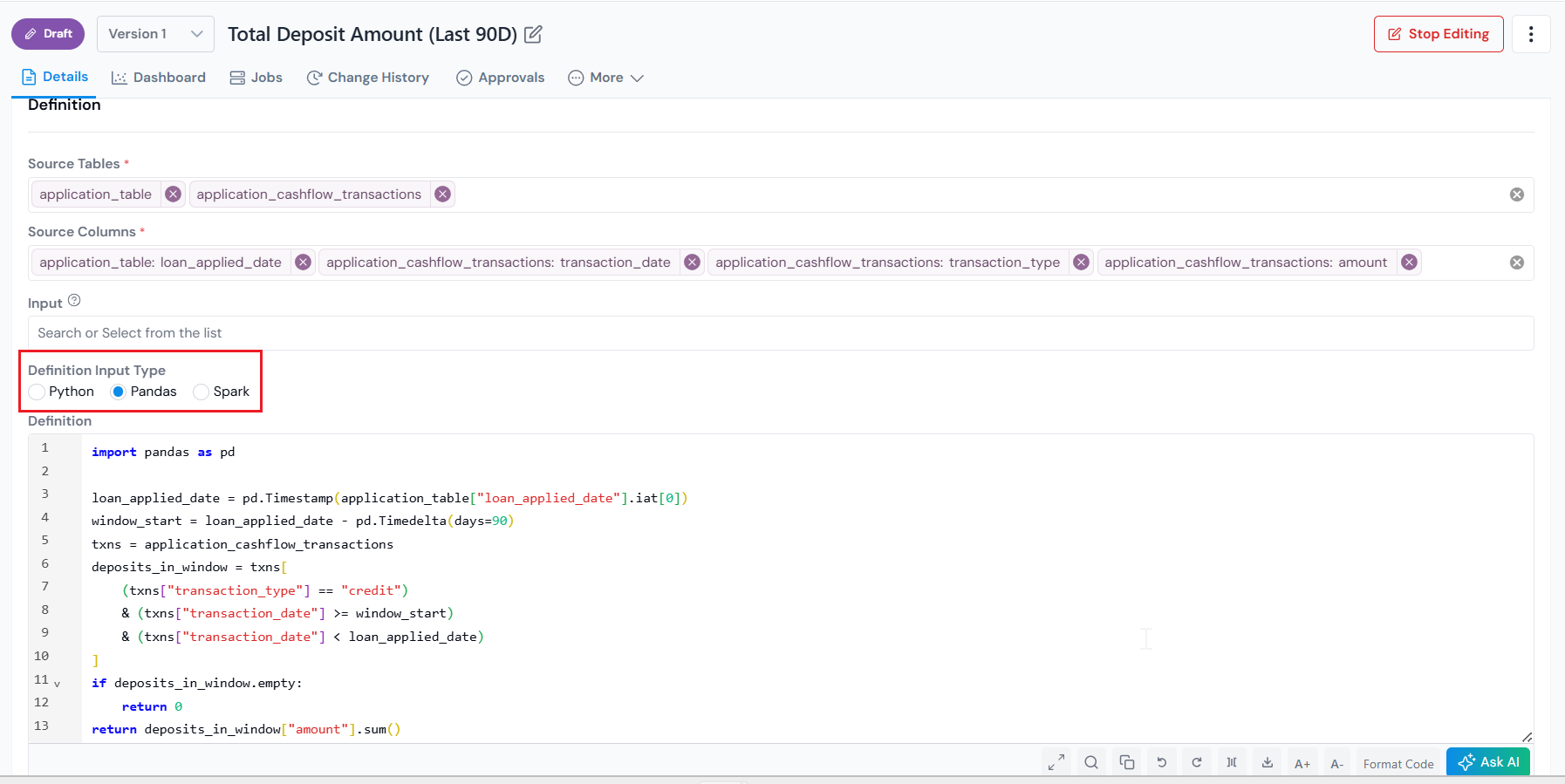
Pandas Input Type exposes each table as a DataFrame, already filtered to the current entity.
When you select **Pandas** as the Input Type, each source table is exposed as a **pandas DataFrame**, sliced to the rows belonging to the current entity.
**Example 1: Total number of accounts for customer**
*Inputs:*
- **Source Tables**: `account`
- **Source Columns**: `account_id`
Only `account_id` is selected, so `account` is a single-column DataFrame. The platform hands your code a DataFrame that looks like this:
```text
# `account`:
# account_id
# 0 101
# 1 102
# 2 103
```
Then your aggregation runs on top of it:
```python
# `account` is a pandas DataFrame
return account['account_id'].nunique()
```
**Example 2: Default in the next 12 months of application**
*Inputs:*
- **Source Tables**: `account`, `account_performance`
- **Source Columns**: `account.account_application_date`, `account_performance.record_date`, `account_performance.charge_off_amount`
Each table becomes its own DataFrame, holding only the selected columns and only the rows for the current customer. The platform hands your code DataFrames that look like this:
```text
# `account`:
# account_application_date
# 0 2024-01-15
# `account_performance`:
# record_date charge_off_amount
# 0 2024-04-01 NaN
# 1 2024-08-15 500.0
# 2 2025-03-01 NaN
```
Then your aggregation runs on top of it:
```python
import datetime
# get the account records with `record_date` within 1 year of `account_application_date`
application_date = account['account_application_date'].iat[0]
account_perf_within_1_year = account_performance[
(application_date < account_performance['record_date']) &
(account_performance['record_date'] - application_date < datetime.timedelta(days=365))
]
# drop the records that don't have a charge-off amount
account_perf_with_co_amt = account_perf_within_1_year.dropna(subset=['charge_off_amount'])
if account_perf_with_co_amt.empty:
return 0
if account_perf_with_co_amt['charge_off_amount'].sum() > 0:
return 1
else:
return 0
```
**Example 3: Total deposit amount in the 90 days before application**
*Inputs:*
- **Source Tables**: `application_table`, `application_cashflow_transactions`
- **Source Columns**: `application_table.loan_applied_date`, `application_cashflow_transactions.transaction_date`, `.amount`, `.transaction_type`
Entity is Application, so both DataFrames are sliced to one application's rows. The platform hands your code DataFrames that look like this:
```text
# `application_table`:
# loan_applied_date
# 0 2025-04-01
# `application_cashflow_transactions`:
# transaction_date amount transaction_type
# 0 2025-01-15 200 credit
# 1 2025-02-20 500 debit
# 2 2025-03-10 300 credit
```
Then your aggregation runs on top of it:
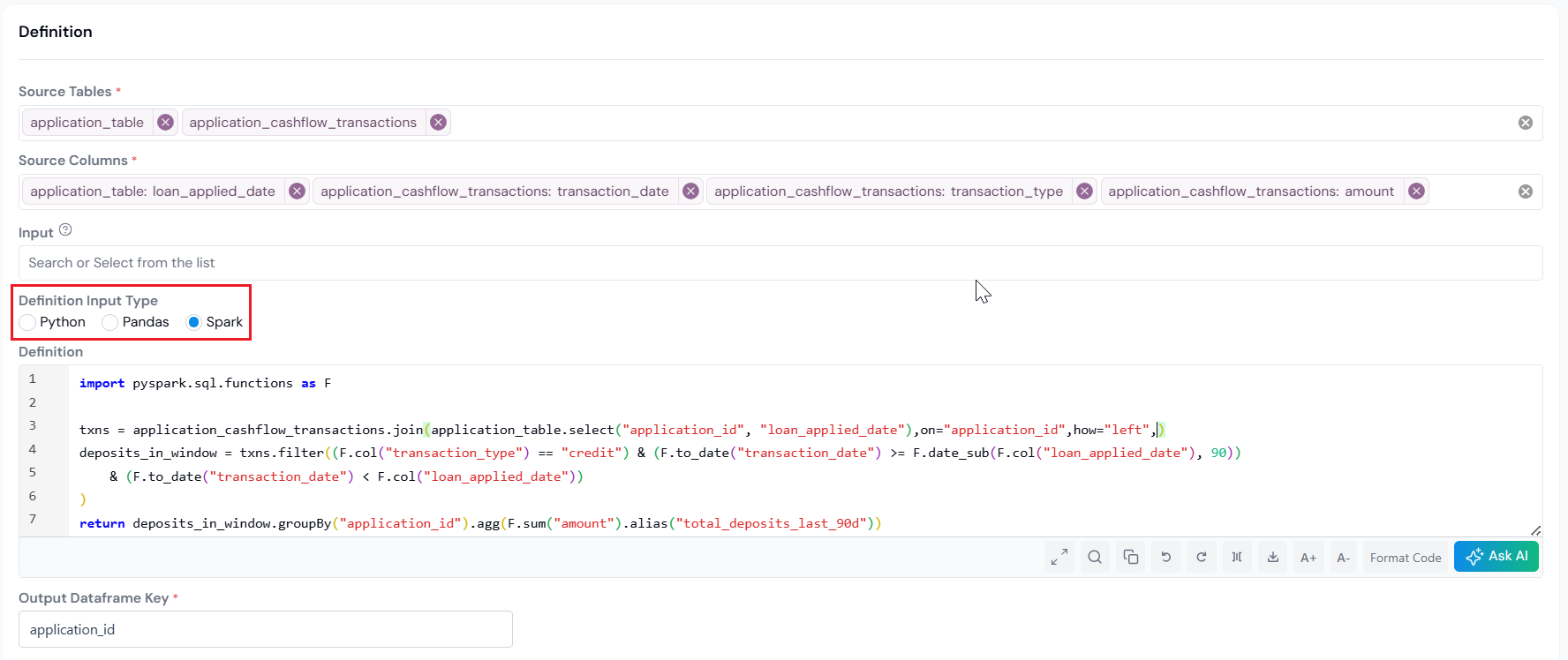
Spark Input Type exposes each table as an ungrouped DataFrame across all entities. The Output Dataframe Key field sits below the editor.
When you select **Spark** as the Input Type, each source table is exposed as a **Spark DataFrame** containing the full, ungrouped table across every entity. You do the `groupBy` yourself in code, and the return value must be a 2-column DataFrame: the entity key (for example, `customer_id`) and the aggregated value.
:::caution[Spark constraints]
- **SELECT only.** Use `SELECT` queries on the input tables. `CREATE`, `INSERT`, `DROP`, and similar mutations are not allowed.
- **No external data reads.** Do not read from outside sources with `spark.read.csv`, `spark.read.parquet`, or similar. Use only the tables provided as inputs.
- **Self-contained logic.** Each Data Element's code must run on its own. Do not depend on intermediate state from another Data Element.
- **No cross-Data-Element UDFs or temp views.** UDFs and temp views registered in one Data Element must not be used in another.
:::
**Example 1: Total number of accounts for customer**
*Inputs:*
- **Source Tables**: `customer_to_account`
- **Source Columns**: `customer_id`, `account_id`
Spark hands you the full table across every customer:
```text
# `customer_to_account`:
+-----------+----------+
|customer_id|account_id|
+-----------+----------+
| 42| 101|
| 42| 102|
| 42| 103|
| 43| 201|
| 43| 202|
+-----------+----------+
```
Then your aggregation runs on top of it, doing the `groupBy` yourself:
```python
import pyspark.sql.functions as F
# `customer_to_account` is a Spark DataFrame
return customer_to_account.groupBy('customer_id').agg(
F.countDistinct('account_id')
)
```
**Example 2: Default in the next 12 months of application**
*Inputs:*
- **Source Tables**: `account`, `account_performance`
- **Source Columns**: `account.account_id`, `account.application_date`, `account_performance.account_id`, `account_performance.record_date`, `account_performance.COAMT`
Both tables arrive ungrouped, with the join key included so you can stitch them together. The platform hands your code DataFrames that look like this:
```text
# `account`:
+----------+----------------+
|account_id|application_date|
+----------+----------------+
| 101| 2024-01-15|
| 201| 2024-02-10|
+----------+----------------+
# `account_performance`:
+----------+-----------+-----+
|account_id|record_date|COAMT|
+----------+-----------+-----+
| 101| 2024-04-01| null|
| 101| 2024-08-15| 500|
| 201| 2024-05-20| null|
+----------+-----------+-----+
```
Then your aggregation runs on top of it:
**Example 3: Total deposit amount in the 90 days before application**
*Inputs:*
- **Source Tables**: `application_table`, `application_cashflow_transactions`
- **Source Columns**: `application_table.application_id`, `application_table.loan_applied_date`, `application_cashflow_transactions.application_id`, `.transaction_date`, `.amount`, `.transaction_type`
Full unfiltered tables across all applications. The platform hands your code DataFrames that look like this:
```text
# `application_table`:
+--------------+-----------------+
|application_id|loan_applied_date|
+--------------+-----------------+
| A001| 2025-04-01|
| A002| 2025-04-05|
+--------------+-----------------+
# `application_cashflow_transactions`:
+--------------+----------------+------+----------------+
|application_id|transaction_date|amount|transaction_type|
+--------------+----------------+------+----------------+
| A001| 2025-01-15| 200| CREDIT|
| A001| 2025-02-20| 500| DEBIT|
| A001| 2025-03-10| 300| CREDIT|
| A002| 2025-02-25| 400| CREDIT|
+--------------+----------------+------+----------------+
```
Then your aggregation runs on top of it. Join on `application_id`, filter, then aggregate back to one row per application:
:::note[Set the Output Dataframe Key]
Spark adds an extra **Output Dataframe Key** field below the editor. Enter the name of the entity key column in your returned DataFrame (for example, `customer_id`, `account_id`, or `application_id`). The platform uses this to join the aggregation result back to the parent entity.
:::
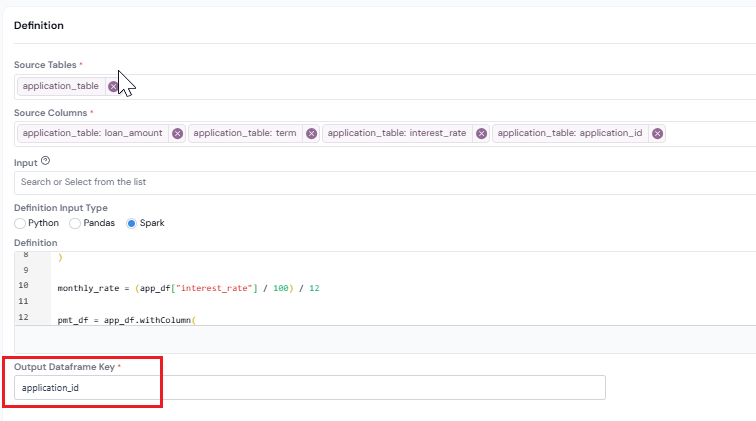
Enter the exact name of the entity key column in the DataFrame your code returns.
#### Fill in Properties and Create
Fill in the [Properties](/user-guide/how-tos/common-registration-info/#properties) (Description, Permissible Purpose, Group, and Keywords), then click **Create** at the bottom right. The Data Element is saved as a draft and you land on its details page.
## What's Next
Once registered, the Data Aggregate can be used across [Features](/user-guide/how-tos/register-a-feature/), [Models](/user-guide/how-tos/register-a-model-definition/), and [Policies](/user-guide/how-tos/register-policy-decision-workflow/) just like any other Data Element. You can also [run a simulation](/user-guide/how-tos/run-a-simulation/) on it (with reports for summary statistics, distributions, and percentage of missing values) and trace its lineage to every downstream object.
Next steps:
- Build a [Feature](/user-guide/how-tos/register-a-feature/) on top of this Data Aggregate.
- Send it for [approval](/user-guide/how-tos/approve-an-object/) so it can be used outside your draft workspace.
- Need a value that reads straight from one column (like `annual_income`)? Register a simple [Data Element](/user-guide/how-tos/register-a-data-element/) instead.