--- title: "Register a Reason Code" description: "Register Reason Codes to build the catalog of adverse-action reasons your Models and Policies return." ---
TL;DR
A Reason Code maps a decision or score to an explanation code, such as an adverse-action reason. Open Resources → Reason Codes, click + New Reason Code, set an Alias and a Code, tick Is Model Driven if a Model produces it, describe it, and create.
## What is it? A **Reason Code** is a registered object that maps a decision or score to an explanation code. Build a catalog of Reason Codes for adverse actions, so every decline carries a consistent, documented reason you can communicate to the applicant. Reason Codes are used in two places: - **Models**: a [Model Explainer](/user-guide/how-tos/register-a-model-explainer/) with **Explainer Usage** set to `Reason Code` returns a list of registered Reason Codes for each prediction. Each selected Reason Code is available in the explainer definition by its alias. - **Policies**: a Policy surfaces those codes through a model-driven reason code. See [Register a Policy Decision Workflow](/user-guide/how-tos/register-policy-decision-workflow/). A Reason Code is a governed object. It has a status, can be shared, and appears in the Resources [Approval Queue](/user-guide/how-tos/use-the-approval-queue/). ## How to Register
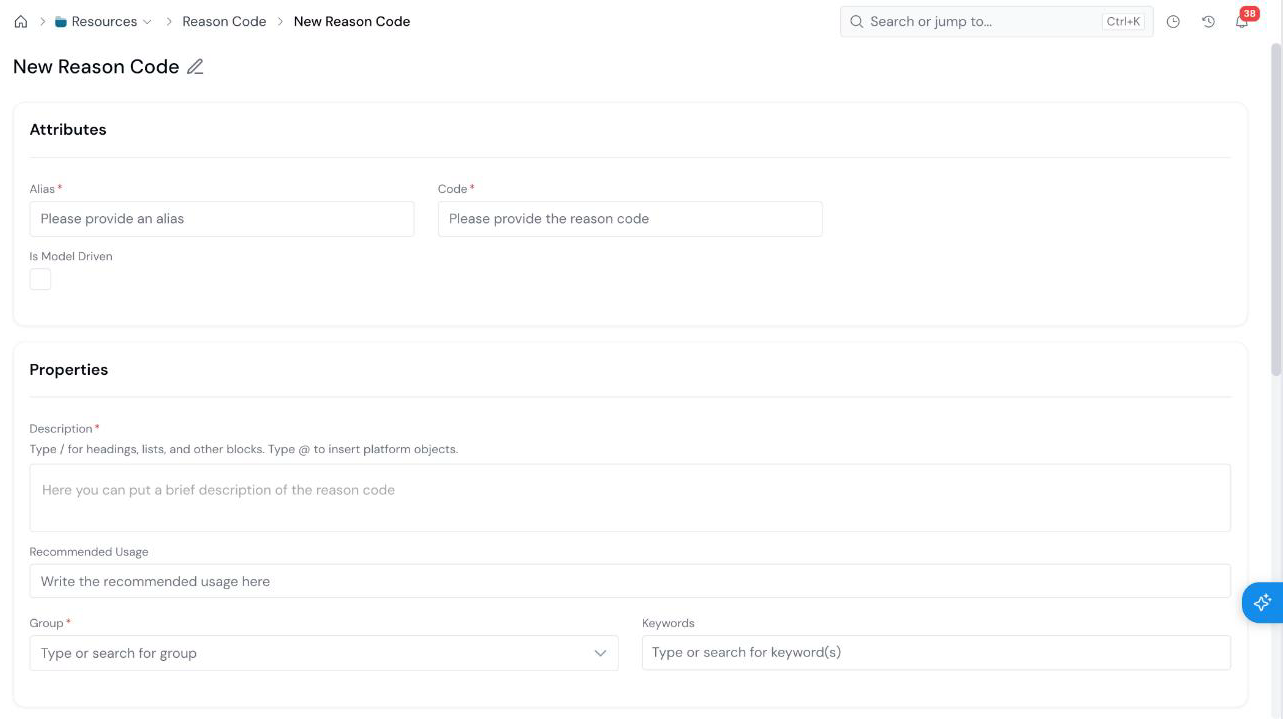
#### Open the Create Form On the **Resources → Reason Codes** page, click **+ New Reason Code**. Use the search box and the **Status** filter on this page to find existing codes. The form opens with an editable name at the top left (**New Reason Code**). Click the pencil icon and type a descriptive name.
#### Set the Attributes New Reason Code form with the Attributes section (Alias, Code, Is Model Driven) and the Properties section (Description, Recommended Usage, Group, Keywords).
Field What it holds
Alias Required The name used to refer to the Reason Code in code (for example, high_utilization). See Common Registration Info.
Code Required The reason code itself, as it appears in your adverse-action notices.
Is Model Driven Tick this when a Model produces the code, rather than a rule.
#### Fill in Properties and Create Fill in the [Properties](/user-guide/how-tos/common-registration-info/#properties):
Field What it holds
Description Required What the reason means. Type / for headings and lists, and @ to insert a link to another platform object.
Recommended Usage Guidance on when to apply the code.
Group Required The group the Reason Code is filed under.
Keywords Optional tags that make the code easier to find.
Click **Create** at the bottom right.
## What's Next - [Register a Model Explainer](/user-guide/how-tos/register-a-model-explainer/) to return Reason Codes from a Model. - [Approve an Object](/user-guide/how-tos/approve-an-object/) to send the Reason Code for review. - [Use the Approval Queue](/user-guide/how-tos/use-the-approval-queue/) to see Reason Codes waiting on you.